How accurate are online sound meters?
Updated June 2026 - Based on NIOSH research and practical testing
By Pankaj · Founder, SoundMeter · Reviewed against OSHA/NIOSH/WHO guidance
If you've ever used a browser-based sound meter and wondered "can I actually trust this number?" - that's a reasonable question. You're measuring with an uncalibrated consumer microphone running through software you didn't write. How close to reality can that be?
The honest answer: closer than most people expect, but with specific limitations you should understand.
What is an online sound meter?
An sound meter online is a web app that uses your device's microphone to capture audio, processes the signal using the Web Audio API, and displays the result as a decibel reading. No download - it runs in your browser.
It does the same fundamental calculation as hardware: capture sound pressure, compute amplitude, convert to logarithmic dB. The difference is microphone quality and the absence of factory calibration.
How online sound meters work
The pipeline:
- Browser requests mic access via
getUserMedia() - Audio stream feeds into a Web Audio API AnalyserNode
- The node runs FFT on each buffer of samples
- Software reads time-domain buffer, calculates RMS amplitude
- RMS converts to dB:
20 * log10(rms)plus an offset
That "offset" is where accuracy gets interesting. A hardware meter knows its mic sensitivity exactly (factory calibration). A browser meter estimates it. This is the primary source of absolute error.
What affects sound meter accuracy?
Automatic Gain Control (AGC)
The biggest accuracy killer. AGC normalizes audio for voice calls - compresses loud, boosts quiet. With AGC active, a 40 dB room and 70 dB room show similar readings. A good online meter disables AGC via getUserMedia constraints.
Microphone hardware
Consumer MEMS mics are flat between 100 Hz and 8 kHz. Below 100 Hz, sensitivity drops. Above 10 kHz, response varies wildly. For indoor environmental noise (200 Hz - 4 kHz), this matters less than expected.
Placement and environment
Desk reflections add 2-6 dB. A laptop mic pointed at the keyboard picks up typing vibration. Wind across the mic port creates false low-frequency readings.
Browser differences
Chrome reliably disables AGC when requested. Firefox mostly does. Safari on iOS has been inconsistent historically.
No calibration
Absolute readings may drift 3-8 dB from truth. Relative readings (comparing environments with the same device) remain consistent.
Online sound level meter vs real sound level meter
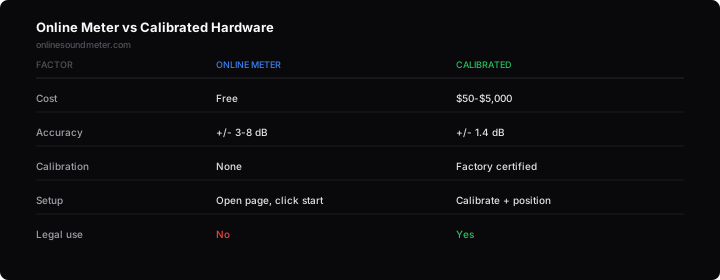
| Factor | Online meter | Calibrated hardware (Class 2) |
|---|---|---|
| Accuracy | +/- 3-8 dB | +/- 1.4 dB |
| Relative accuracy | 1-2 dB | 0.5 dB |
| Freq. range | ~100 Hz - 8 kHz | 20 Hz - 20 kHz |
| Max SPL | ~110 dB (clips) | 130-140 dB |
| Cost | $0 | $50 - $2,000+ |
| Legal validity | No | Yes (with cert) |
For "is my room at 40 dB or 80 dB?" - both answer it. A real sound level meter matters only when exact numbers have legal or regulatory consequences. See also: decibel chart explained.
Can smartphones measure decibels accurately?
NIOSH evaluated sound measurement apps and found well-designed iOS apps achieve accuracy within 2 dB of a Class 1 meter. Android varies more due to hardware diversity.
Key findings:
- iOS apps using calibrated mic API: within 2 dB
- Android apps: variable, some off by 5-10 dB
- AGC-disabled apps consistently outperform those that don't
- External mics improve all platforms
Typical accuracy range of online sound meters
| Environment | Typical reading | Expected error |
|---|---|---|
| Very quiet (actual: 25 dB) | 28-38 dB | +3 to +13 (noise floor) |
| Quiet office (actual: 45 dB) | 42-50 dB | +/- 3-5 dB |
| Normal speech (actual: 60 dB) | 57-65 dB | +/- 3-5 dB |
| Busy room (actual: 75 dB) | 72-80 dB | +/- 3-5 dB |
| Loud (actual: 90 dB) | 85-95 dB | +/- 3-5 dB |
Worst accuracy is at very low levels. Consumer mics have self-noise around 25-35 dB. In the 40-90 dB sweet spot, accuracy is good.
When you should use a professional sound level meter
Use calibrated hardware for:
- OSHA compliance audits (1910.95 requirements)
- Legal noise disputes and court evidence
- Building acoustic certification
- Occupational health exposure records
- Measuring below 30 dB or above 110 dB
An online meter is fine for:
- Checking room suitability for recording or calls
- Comparing two spaces
- Classroom noise monitoring
- General noise awareness
- Documenting relative changes
For safe noise thresholds by environment: safe noise level in dB guide.
Tips to improve measurement accuracy
- Use Chrome. Best AGC/noise suppression disable support.
- Don't cover the mic. Know where your device's mic port is.
- Measure at ear height. Not on a desk surface (vibrations).
- Run 2-3 minutes minimum. Short measurements get skewed by random events.
- Close other mic apps. Avoid conflicts.
- Disable system audio enhancements. Windows Communication activity settings can override browser constraints.
- External USB mic. $30-50 gets you more consistent frequency response than any built-in mic.
Test your environment
Open the meter, stay quiet for 60 seconds, compare to the expected ranges above.
Open sound level meterFrequently asked questions
How accurate are online sound meters compared to professional equipment?
Why does my phone show a different reading than my laptop?
Can I trust an online sound meter for workplace safety?
What's the biggest factor affecting online meter accuracy?
Do phone decibel meter apps work?
Is a free online sound meter good enough for checking my room?
How can I improve accuracy of browser-based measurements?
Should I calibrate my online sound meter?
Conclusion
Online sound meter accuracy is good enough for every practical decision that doesn't end up in a legal document. If you need to know whether your office is 45 dB or 85 dB - whether your bedroom is quiet enough, whether your recording space has an acceptable noise floor - a browser-based meter answers those questions reliably. For more on hearing protection standards, see NIOSH hearing loss prevention.
Where it can't help: situations requiring certified measurements with documented uncertainty. That's what calibrated hardware exists for. Most people will never need it. The gap between "useful for real decisions" and "legally defensible" is where an online sound level meter sits - firmly on the useful side.